Your team, thoughtfully built.
Is It Safe to Run AI Agents on My Computer? Yes. Here's Why
Yes, and here's why. With Staffmor, your office runs on your own computer, and your team's records and chat are stored there. Your agents work through your own Claude or ChatGPT account, under the security programs Anthropic and OpenAI already run. Staffmor never asks for your provider password, and your team's rules tell every agent to get your yes before sending, buying or publishing anything you haven't approved. Below is what each of those means in practice, and the three settings worth a minute of your time.
Your office runs on your computer
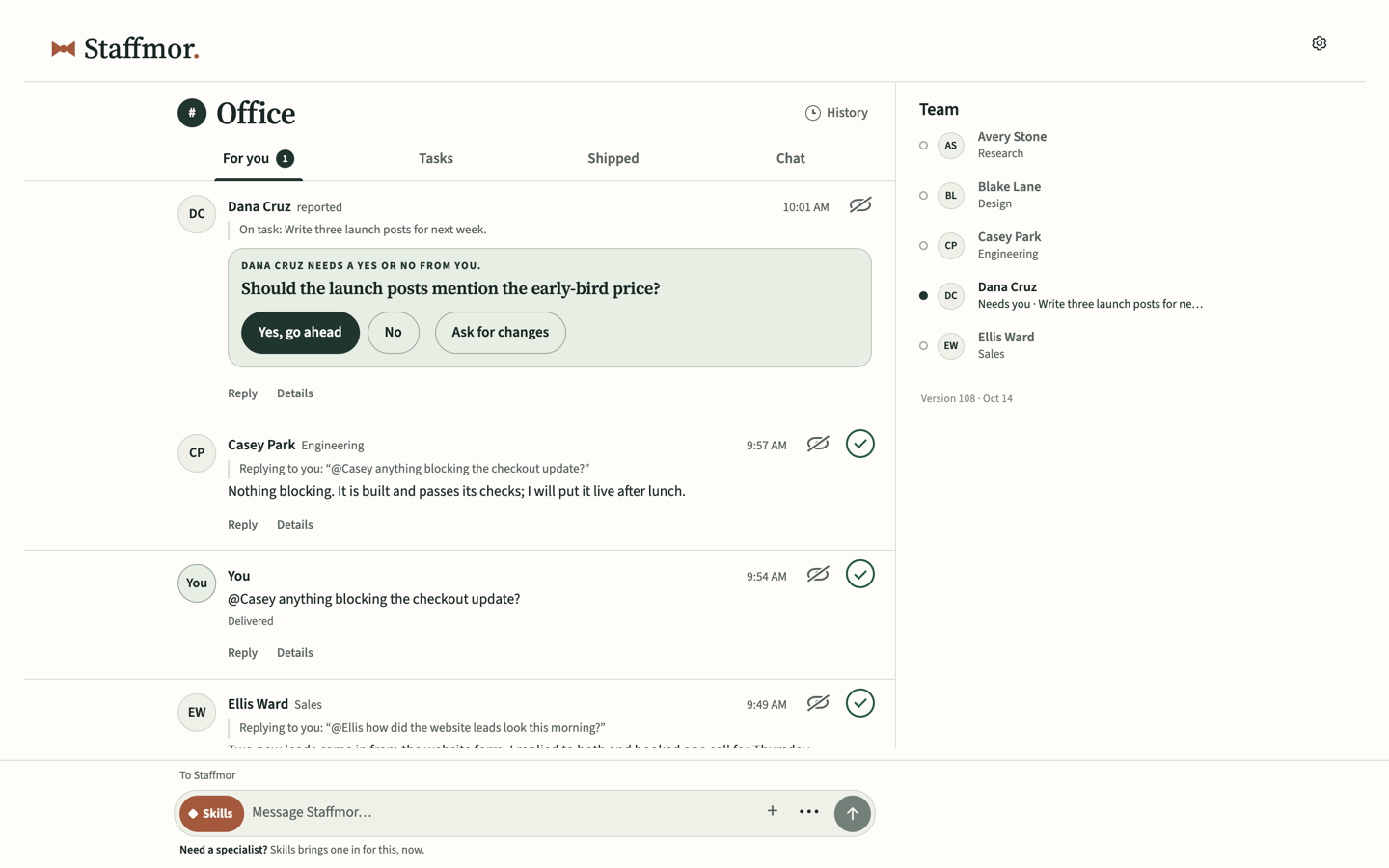
Staffmor isn't a hosted chatbot. Your office is a local app on your own computer: the team's channels, tasks and decisions, and the home that shows what needs you. It saves to your office folder, not to Staffmor's cloud. You open it from a launcher on your machine, in your own browser.
Staffmor's hosted service handles what can't live on one machine: your account and billing, the setup choices you save on the website, and license and device records, plus the relay for any phone you add (more on that below). New offices start local-only.
AI agent data privacy: your provider's protections come with you
Your agents don't run on a model Staffmor hosts. They work through Claude Code or Codex, signed in to your own Claude or ChatGPT account. The requests and files your agents work with go to Anthropic or OpenAI under your account's terms, and the safeguards those companies run apply to your work too:
- Anthropic develops Claude Code under its comprehensive security program, and makes its SOC 2 Type 2 report and ISO 27001 certificate available in the Anthropic Trust Center (Claude Code security). Claude Code encrypts what it sends to Anthropic in transit (data usage).
- OpenAI lists its SOC 2 Type 2 report and its ISO 27001, 27017, 27018 and 27701 certifications in the OpenAI Trust Portal.
Those are independent audits of the same companies your agents already use. Staffmor adds a team around them, not another place your work has to trust.
Staffmor never asks for your provider password
You install Claude Code or Codex and sign in through Anthropic or OpenAI, in their own apps. Staffmor's setup guide tells your assistant never to ask for passwords, API keys or purchase tokens, and the setup page says it plainly: your provider password is never entered there.
The Staffmor installer is checked too. It fetches pinned, signed details of the release, verifies the download's hashes and refuses anything that has been tampered with. Before anything installs, it asks you to approve the download in your own browser.
Claude Code's and Codex's own safety controls stay on
Staffmor doesn't change Claude Code's or Codex's permission and sandbox settings. You open your assistant in your office folder yourself, so its own controls apply as usual:
- Claude Code uses permission modes. In Manual mode it "stops and asks you before most actions that edit files, run shell commands, or reach the network." In auto mode, a separate classifier model reviews actions before they run and blocks anything that "escalates beyond your request" (Anthropic).
- Codex runs in a sandbox enforced by your operating system. By default its network access is off, and it asks before it edits outside the workspace or goes online (OpenAI).
Staffmor's setup guide also tells your assistant what to do when one of those controls blocks it: stop, tell you in one sentence, and never look for a way around it. Even Codex's optional automatic pickup needs your explicit consent for the office folder and network first.
Every agent asks before it sends, buys or publishes
Your team's rules tell every agent to get your yes before sending, buying or publishing anything you haven't approved. Routine, reversible work keeps moving: drafts, research, checklists and spreadsheet updates. A customer reply, a purchase or a public post waits for you.
Roles carry the same idea. In Staffmor's small-business team, Customer Support hands anything about refunds or complaints to you, and the Bookkeeping Assistant asks rather than guessing at a missing receipt. See the four roles in AI employees for small business.
Check in from your phone, through your own office
When you want your team in your pocket, add your phone to your office. You add each device yourself, with a one-use sign-in link sent to your checkout email. Your phone then reaches your office through Staffmor's relay. The relay carries what your office shares with that phone, and the requests you send back, and your office applies or rejects each request. Lose a phone? Disconnect it from your office, and it's cut off.
The relay runs over HTTPS. It can keep what it carries for a connected device, and it isn't end-to-end encrypted. The privacy policy and our guide to what stays on your computer have the details.
Three settings worth a minute
- One folder. Give your team its office folder, not your whole computer.
- Your assistant's permission mode. Choose it on purpose. Staffmor can't restrict a tool you start with full access.
- Your AI account's data settings. On Claude Free, Pro and Max you decide whether your chats help train new models, and you can change that any time (Anthropic). If you use ChatGPT, review its data settings once, too.
Start your office
Set up Claude Code or Codex with an empty folder. Staffmor prepares the office after your approvals. Your office runs on your computer, your own AI account does the work, and you decide what leaves the business. Set up your office → · See Staffmor for businesses →
Your own AI account does the work, and nothing installs or connects until you approve it.
Common questions
Does Staffmor see my files? Your office and its files stay on your computer. Staffmor's hosted service keeps your account, billing, saved setup choices, and license and device records. If you add a phone, the relay carries what your office shares with it.
Does Staffmor store my Claude or ChatGPT password? No. Staffmor never asks for your provider password. You sign in through Anthropic or OpenAI.
Can an agent spend money or email a customer without me? Your team's rules tell every agent to get your yes before sending, buying or publishing anything you haven't approved, and your assistant's own permission controls still apply.
Is Staffmor made by Anthropic or OpenAI? No. Staffmor is independent and isn't affiliated with or endorsed by either company.
Related: Running AI agents on your computer: what stays local · Claude Code vs Codex
Sources
All read October 14, 2026.